The terminal cockpit, tab by tab
triage tui is the terminal cockpit of a triage-pg project. It is built on
lynkeus, a shared Textual shell that
gives every PostgreSQL-backed project the same six screens, keys and theme;
triage-pg supplies three adapters and three screens of its own. Nothing on
any tab is computed in the TUI: every number is a SELECT over the views the
dashboard and the
CLI already read (headless-complete core,
ADR-0012), and the one thing it writes — refreshing the leaderboard
matview — runs the CLI as a subprocess and shows its exit code.
just tui # uv run triage tuiuv run triage tui --poll 10 # refresh the active tab every 10 s (0 = off)The database is resolved exactly as for every other verb: --dbfile ›
database.yaml in the current directory › DATABASE_URL › PG*. Credentials
never appear in the TUI, its state files or its logs.
1–5 open the standard tabs, 6–8 the triage ones, ? help. Everywhere:
/ focuses the current filter, ^p opens the command palette (tabs, refresh,
theme, and every action), r refreshes, t flips dark/light, q quits. Each
tab shows its own keys in the row above the footer.
Status
Section titled “Status”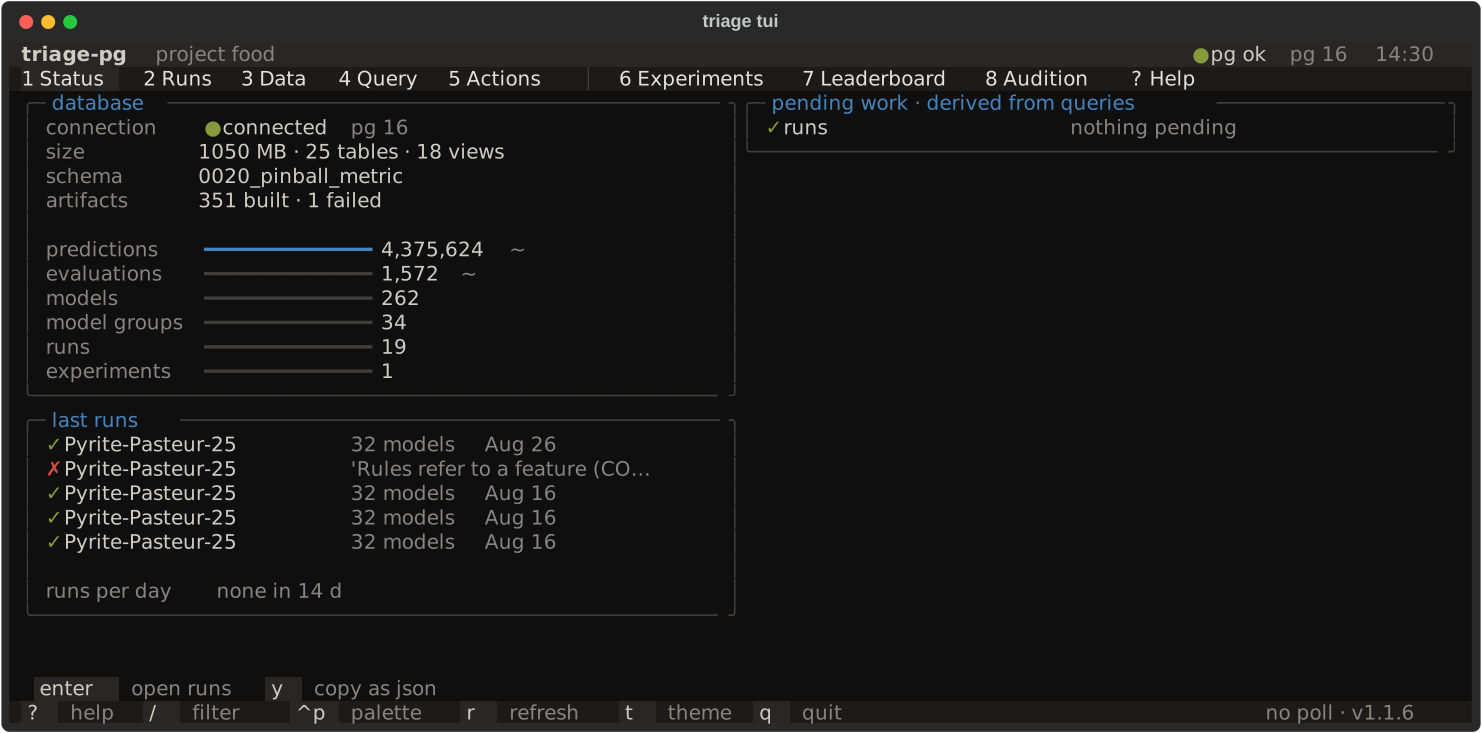
Database facts (size, relation counts, the alembic stamp, artifacts by
status), row gauges (exact counts for the small tables, planner estimates for
predictions and evaluations), the last five runs, runs per day as a
sparkline, and pending work. A fortnight with no run reads none in 14 d
rather than a flat line — zeros and a steady rate draw the same picture, so
the empty case is said in words. Pending work is never a stored flag: a run
still started after six hours, an artifact stuck in building with no live
run, a leaderboard matview that is missing completed runs, an experiment
without a run. triage status --json prints the same thing.
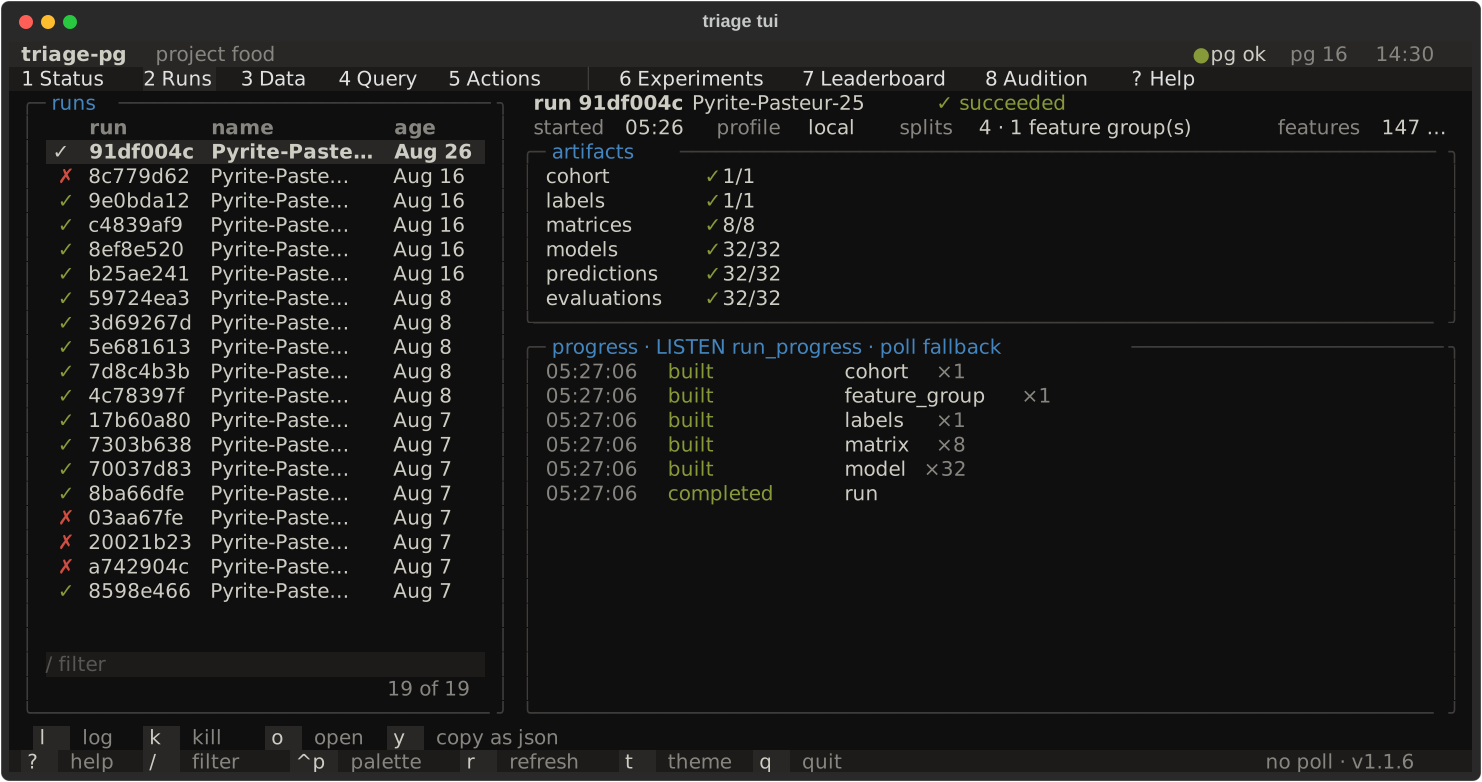
The list on the left (/ filters by name, id or state); the selected run on
the right: its stage table — cohort, labels, matrices, models, predictions,
evaluations, each as done / planned from run_progress, run_artifacts
and the run’s plan, with notes such as 9 cached when a re-run reused
another run’s artifacts — and its live log. A running run streams
LISTEN run_progress notifications (ADR-0021); if LISTEN is unavailable the
adapter polls the run_progress view every five seconds and says so in the
log. A finished run replays its counts. Keys: l focus the log, k kill
(triage-pg has no cancel — the key explains what to do instead), o open the
run in the dashboard ($TRIAGE_DASHBOARD_URL, default the local just serve), y copy the detail as JSON.
Headless: triage runs list, triage runs show <prefix>, triage runs tail <prefix> — all with --json; runs tail --json prints one JSON object per
event, so an agent can follow a run the way the screen does.
Every schema and relation of the project database in a tree with planner row
estimates; the selected relation’s size, vacuum/analyze times, columns with
their comments, indexes with sizes, and three sample rows (enter shows
twenty). 4 opens the relation in Query with a select * ready to run.
A SQL editor (^enter or ^r runs, x runs explain analyze), a results
grid and the saved-queries list. The nine triage views come pre-saved —
leaderboard, run_progress, run_summary, experiment_summary,
audition, audition_distances, model_group_summary, label_base_rate,
cohort_profile — and s saves your own under
~/.local/state/triage/tui/<project>/. Every statement runs inside a
read only transaction that is rolled back, so the screen cannot write.
y copies the rows as JSON, e exports CSV. Headless: triage query "<sql>" --json.
Actions
Section titled “Actions”The palette: every just recipe of the current directory (with its comment as
description) and every verb of the triage CLI, introspected from the typer
app — both parsed by lynkeus’s actions module, the same code every lynkeus
consumer uses. enter runs the highlighted action as a subprocess; its stdout
streams into the right-hand pane and the exit code becomes the state. An
action is confirmed before it starts when its name or comment carries a
destructive word (drop, downgrade, destroy, truncate, delete, rebuild, purge,
reset, clean, prune), and so are gc and archive, which delete artifacts
without saying so in their names.
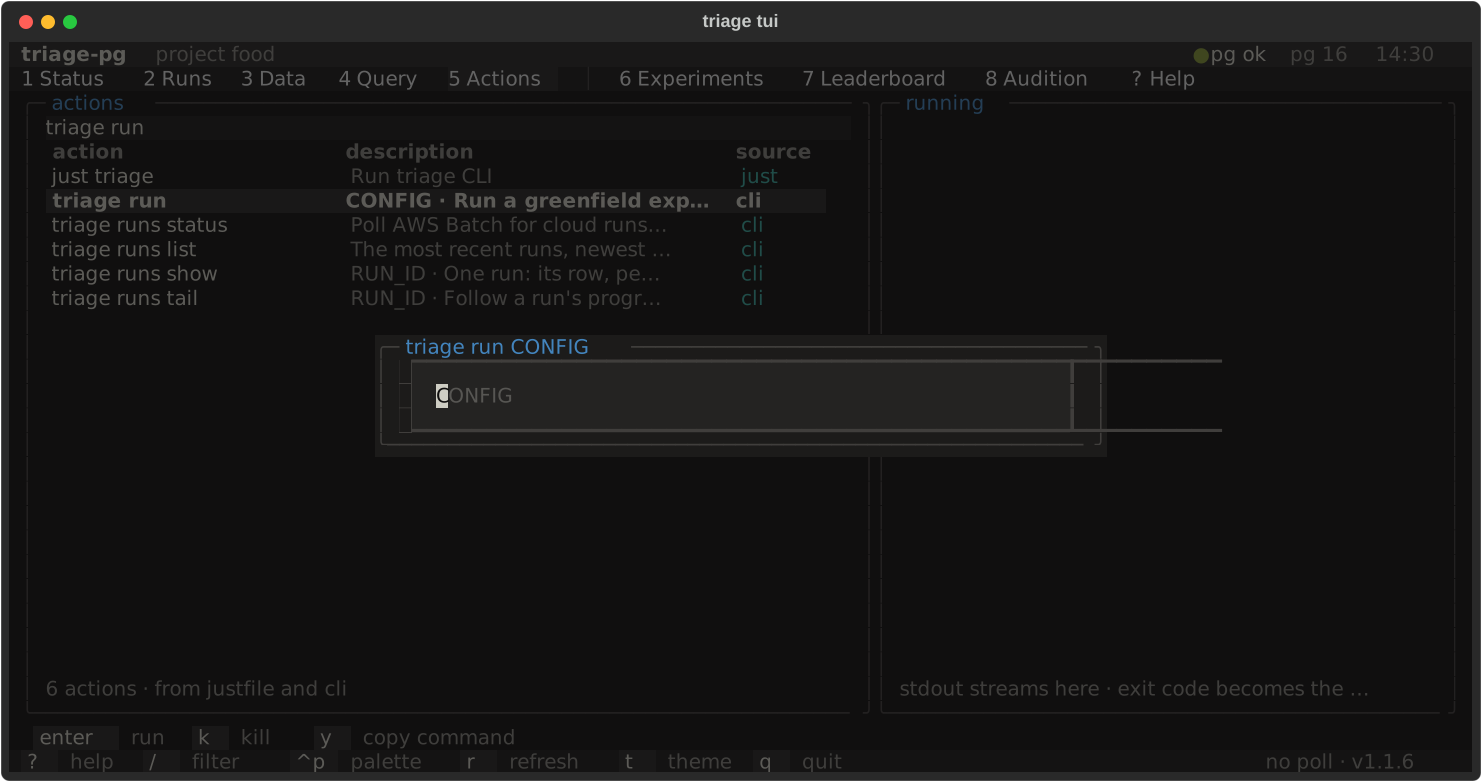
A verb that cannot run without arguments carries them as a hint next to its
description (triage run → CONFIG, triage predictlist → MODEL_ID AS_OF_DATE) and enter prompts for them before starting anything;
escape or an empty answer cancels. Only required arguments prompt — just test *ARGS and triage gc still run bare on enter, and options are passed
headlessly. y copies the command with its arguments. Headless: triage actions list --json, triage actions run "just test", triage actions run triage -- --version.
Experiments (6)
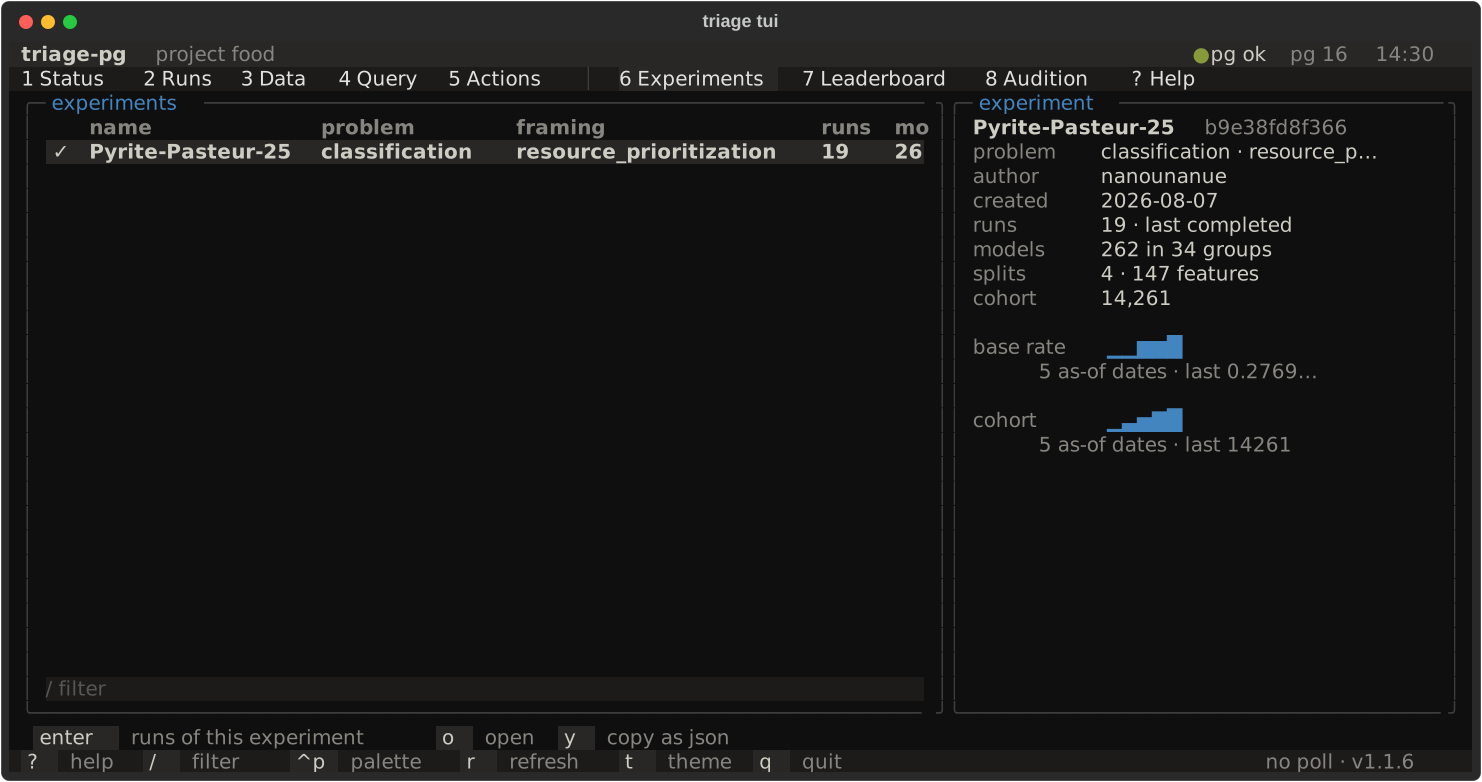
Section titled “Experiments (6)”One row per experiment — a prediction problem, ADR-0022 — from
experiment_summary: problem type, framing, runs, models, base rate, last
run. The detail panel adds the latest run’s base rate and cohort size over
its as-of dates as sparklines. enter opens the Runs tab filtered to this
experiment; o opens it in the dashboard.
Leaderboard (7)
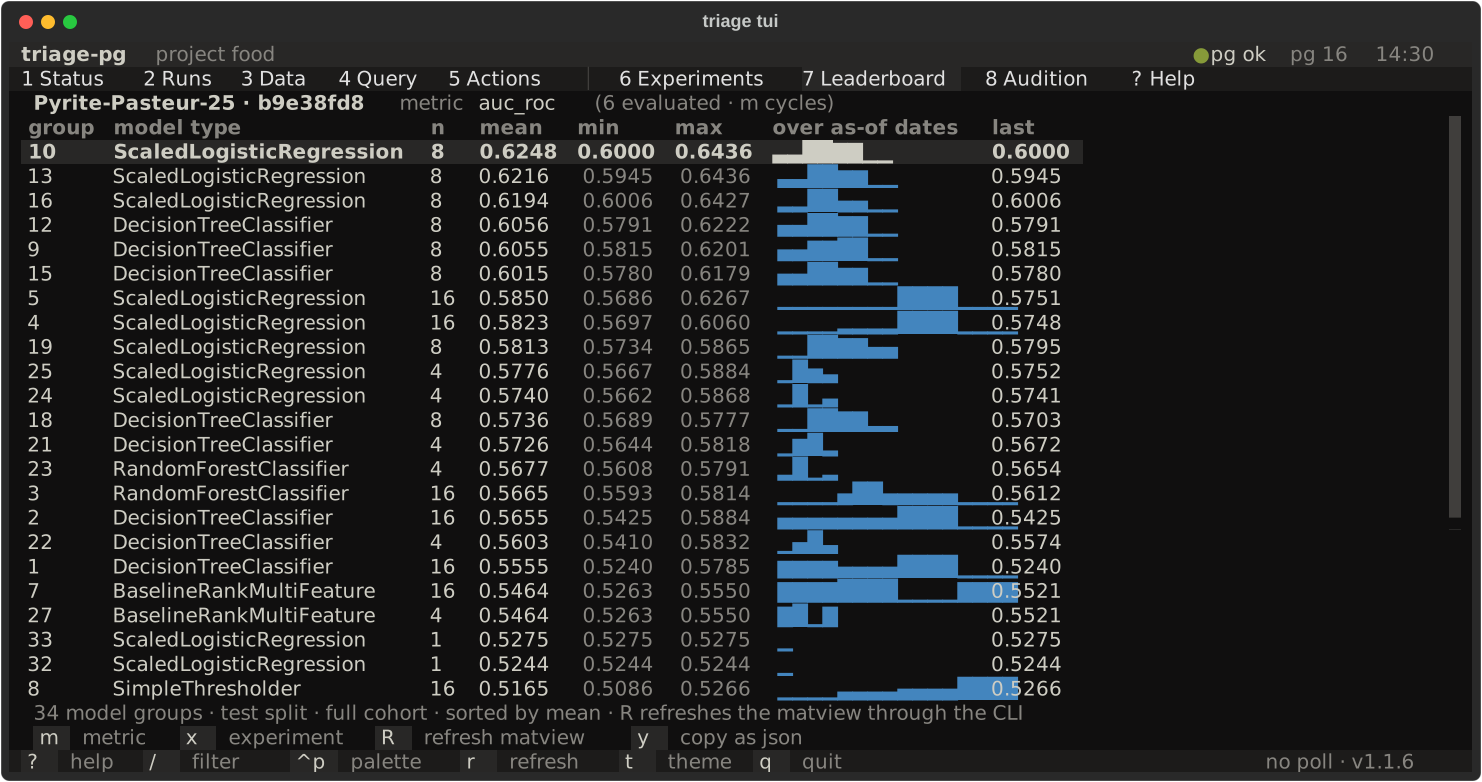
Section titled “Leaderboard (7)”The triage.leaderboard matview for the selected experiment and one
(metric, parameter) pair: one row per model group with mean, min, max, a
sparkline over the test as-of dates and the last value, sorted by mean. m
cycles through the pairs that were actually evaluated, x through the
experiments. R refreshes the matview — through triage leaderboard --refresh, run as a subprocess, its exit code shown in the note line.
Audition (8)
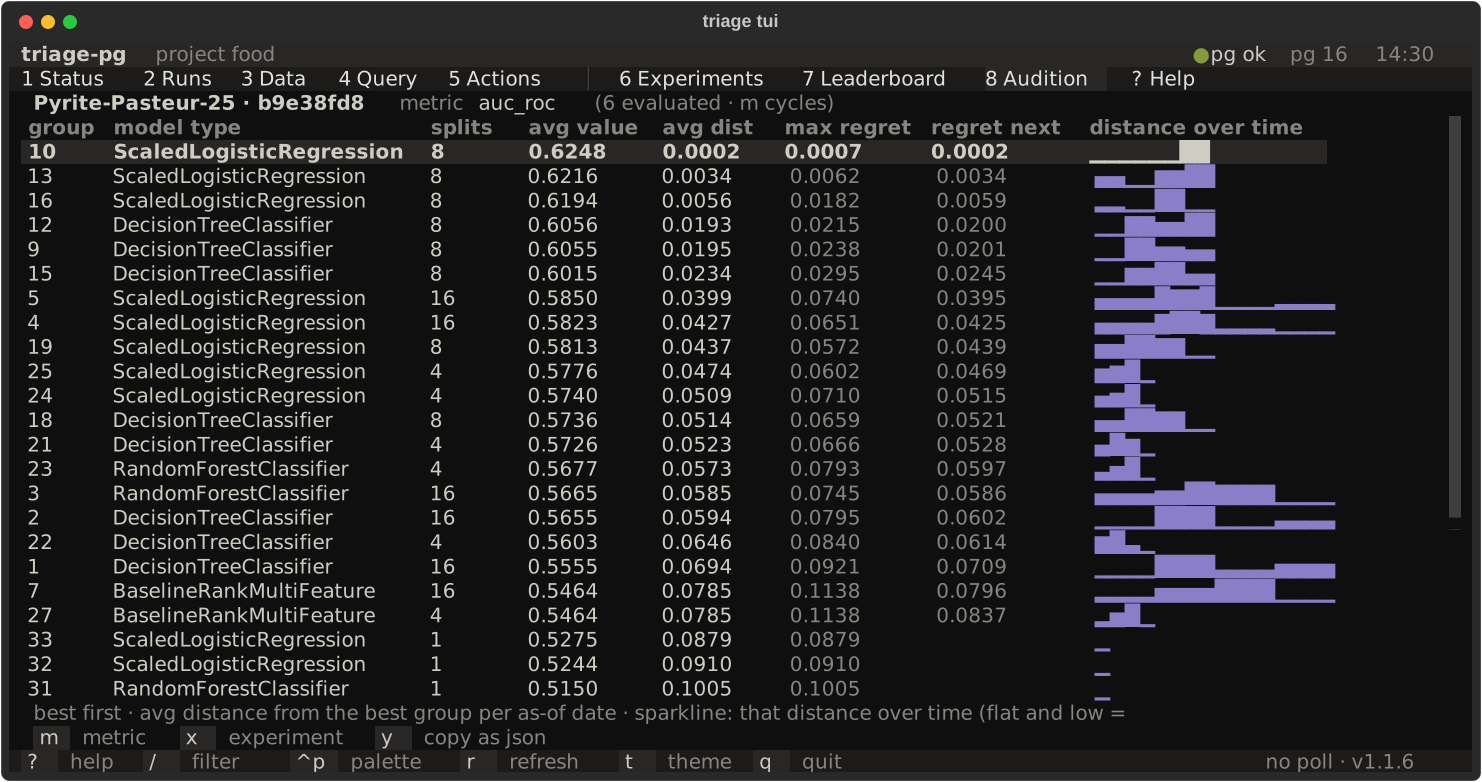
Section titled “Audition (8)”audition_distances and audition for the same experiment and pair: per
model group, the average value, the average distance from the best group at
each as-of date, the maximum regret, the regret at the next date, and a
sparkline of the distance over time — flat and low means steady. Best first.
4 from here opens the distances behind the sparklines in Query.
What stays in the dashboard
Section titled “What stays in the dashboard”Anything richer than a sparkline: the model-group × split heatmap, the
threshold curves, feature importances, crosstabs, the derivation graph. The
o key on a run or an experiment takes you there.