Terminal cockpit
featurizer has no daemon and no run ledger. Its state is a config file plus a
database: the config declares the entity graph and the primitives; the
database holds the source tables and, after to_tables(), the
"<schema>"."<stem>_group_NNN" tables with "<stem>_manifest" beside them.
The cockpit shows one config against one database and answers four
questions without leaving the terminal:
- does every source table the config names exist, with the columns it names?
- what will be generated — the entity graph, the manifest, the SQL?
- what has been materialized, and is every group table the manifest names on disk?
- does the manifest still describe the tables on disk, or has the config moved
since the last
to_tables()?
It is built on lynkeus, the Textual shell shared by this workspace’s data projects, so the keys, the theme and the five standard screens are the same as in triage-pg’s cockpit. featurizer adds three screens of its own.
Install
Section titled “Install”The cockpit is an extra. lynkeus needs Python 3.12, and featurizer’s floor is 3.10, so the extra is empty on 3.10 and 3.11 and the verbs below say so and exit 2 there:
uv add "featurizer[tui] @ git+https://github.com/ccd-ia/featurizer@v1.3.0"# in a checkout:uv sync --extra tuiimport featurizer never imports Textual or lynkeus; only featurizer.tui
does.
Open it
Section titled “Open it”python -m featurizer tui --config path/to/config.yamlpython -m featurizer tui --config path/to/config.yaml --schema featuresCredentials come from PG* or DATABASE_URL, the way the integration tests
read them — in this workspace, from the project’s .envrc via direnv. There
is no default host and no prompt. Bare table names in the config resolve
through the connection’s search_path; to point the cockpit at tables the
examples seed into their own schema, pass it through libpq:
PGOPTIONS="-csearch_path=example_01" python -m featurizer tui \ --config examples/01-basic-aggregations/config.yaml--schema narrows the materialization scan to one schema. Without it every
user schema is scanned, which is right for a throwaway database and noisy for
a shared one.
The screens
Section titled “The screens”Keys 1–5 open the standard screens, 6–8 featurizer’s own, ? help,
^p the command palette, r refresh, t dark/light, q quit.
| Screen | Reads | Keys |
|---|---|---|
| 1 Status | health; facts from the config (entities, relationships, primitives by type, intervals, depth, boundary, manifest width); a row gauge per entity from pg_class.reltuples (never count(*)); a gauge per materialization, group tables present of groups the manifest names; pending work | enter runs · y copy json |
| 2 Runs | one run per <stem>_manifest table found: succeeded when every group table it names exists, failed when some are missing; one stage per group, columns present of columns assigned | y copy as json |
| 3 Data | the catalog: schemas, tables, columns, indexes, sample rows | enter more rows · 4 query this table |
| 4 Query | a read-only editor; saved queries list the manifests and group tables in the database | ^enter run · x explain · e csv |
| 5 Actions | the justfile’s recipes and every featurizer verb, run as subprocesses | enter run · k kill |
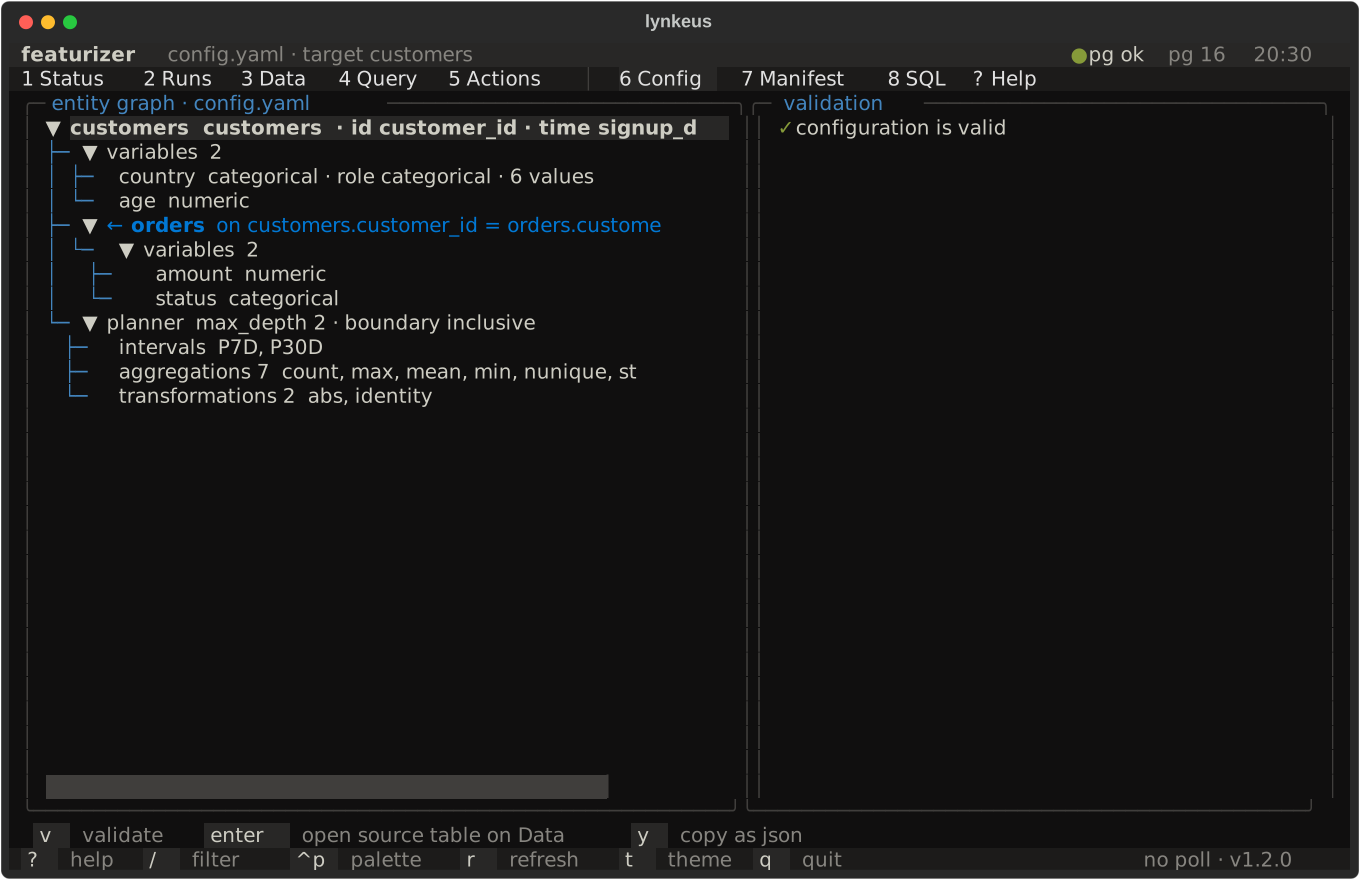
| 6 Config | the entity graph as a tree: the target at the root, each relationship under the entity it hangs from with its keys and temporal mode, each entity’s variables, the primitives and intervals | v validate · enter open the entity’s table on Data · y copy as json |
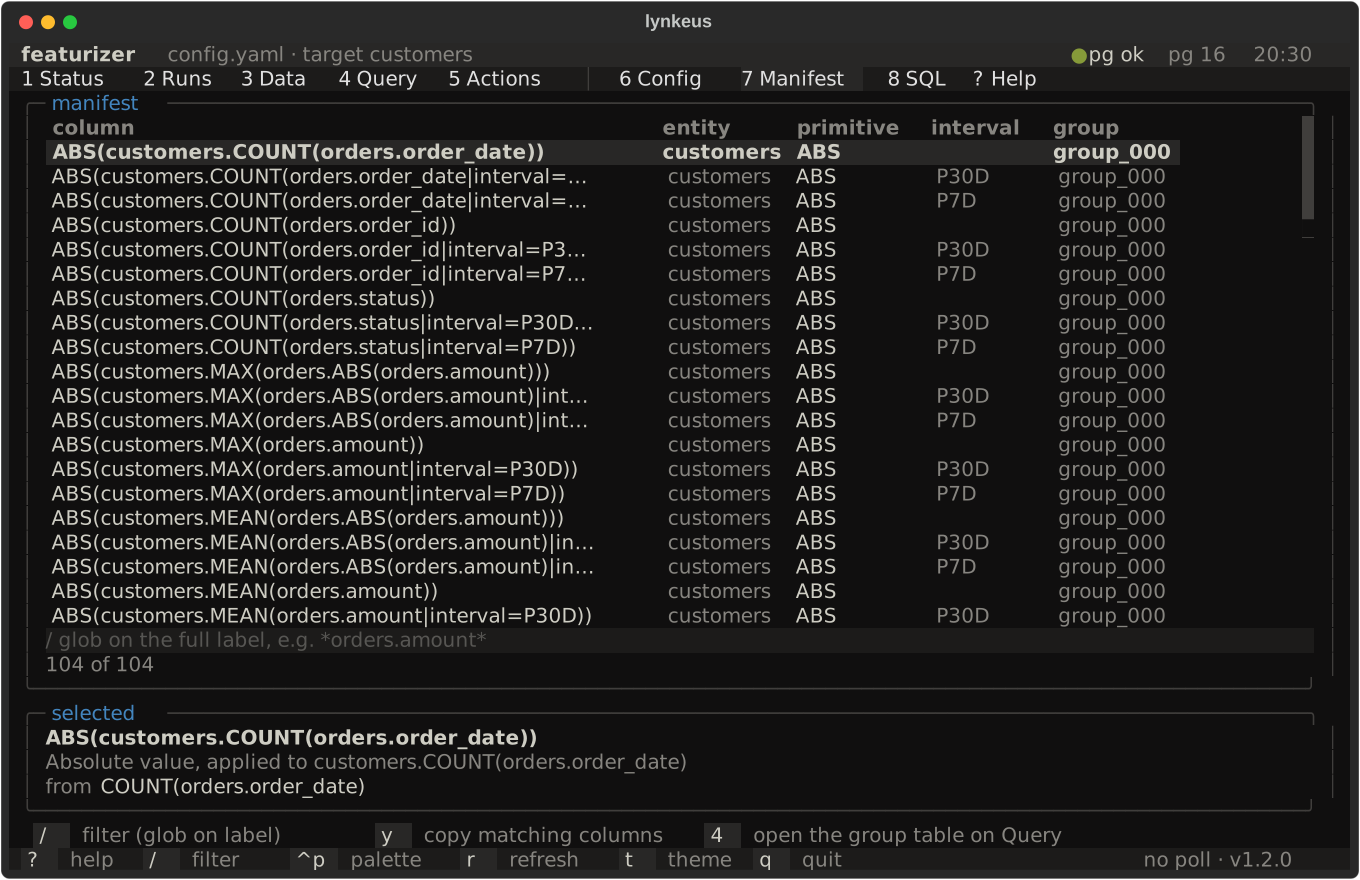
| 7 Manifest | feature_manifest() as a table: column, entity, primitive, interval, group; the full label and description of the selected column underneath | / filter · y copy the matching columns · 4 open the group table on Query |
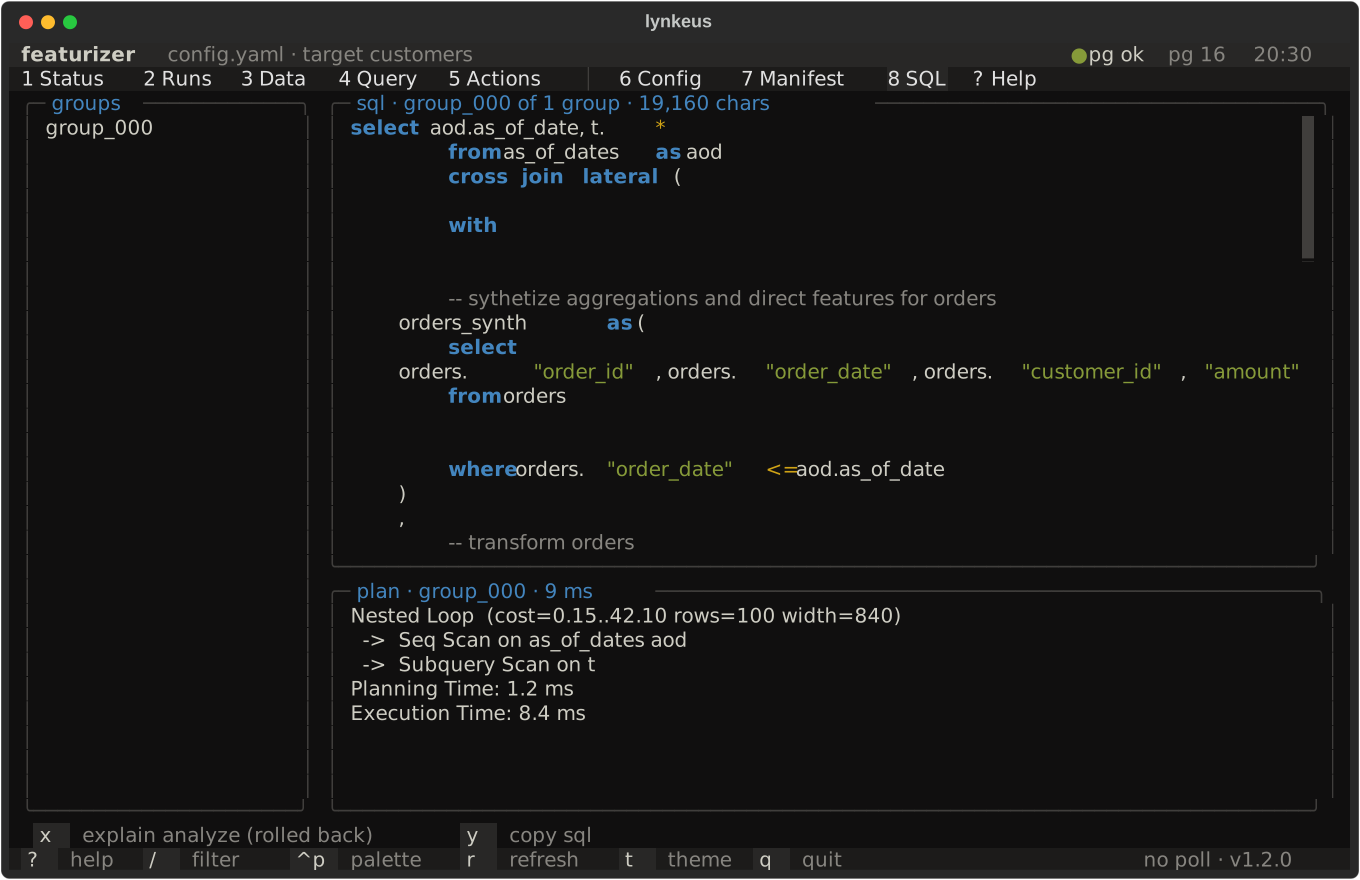
| 8 SQL | query_groups() one group at a time, syntax-highlighted, read-only | x explain analyze (rolled back) · y copy |
The three featurizer screens below are the pictures the test suite takes: every
screenshot on this page is a committed snapshot rendered from the
01-basic-aggregations example against a frozen clock, and a planner change
that moves a column changes the picture.
Three things are worth knowing about how the screens read.
Pending work is a comparison, never a flag. Every line on the Status screen is the config held against the database: a source table that does not exist; columns the config names (id, temporal index, variables, relationship keys) that a table lacks; groups the manifest names that have no table; manifest columns found on no group table, and columns on disk the manifest does not describe; and config drift — labels the loaded config produces that the persisted manifest lacks, or the reverse. The sparkline is an empty note rather than a flat line: there is no time series to draw, because a materialization is a table, not an event.
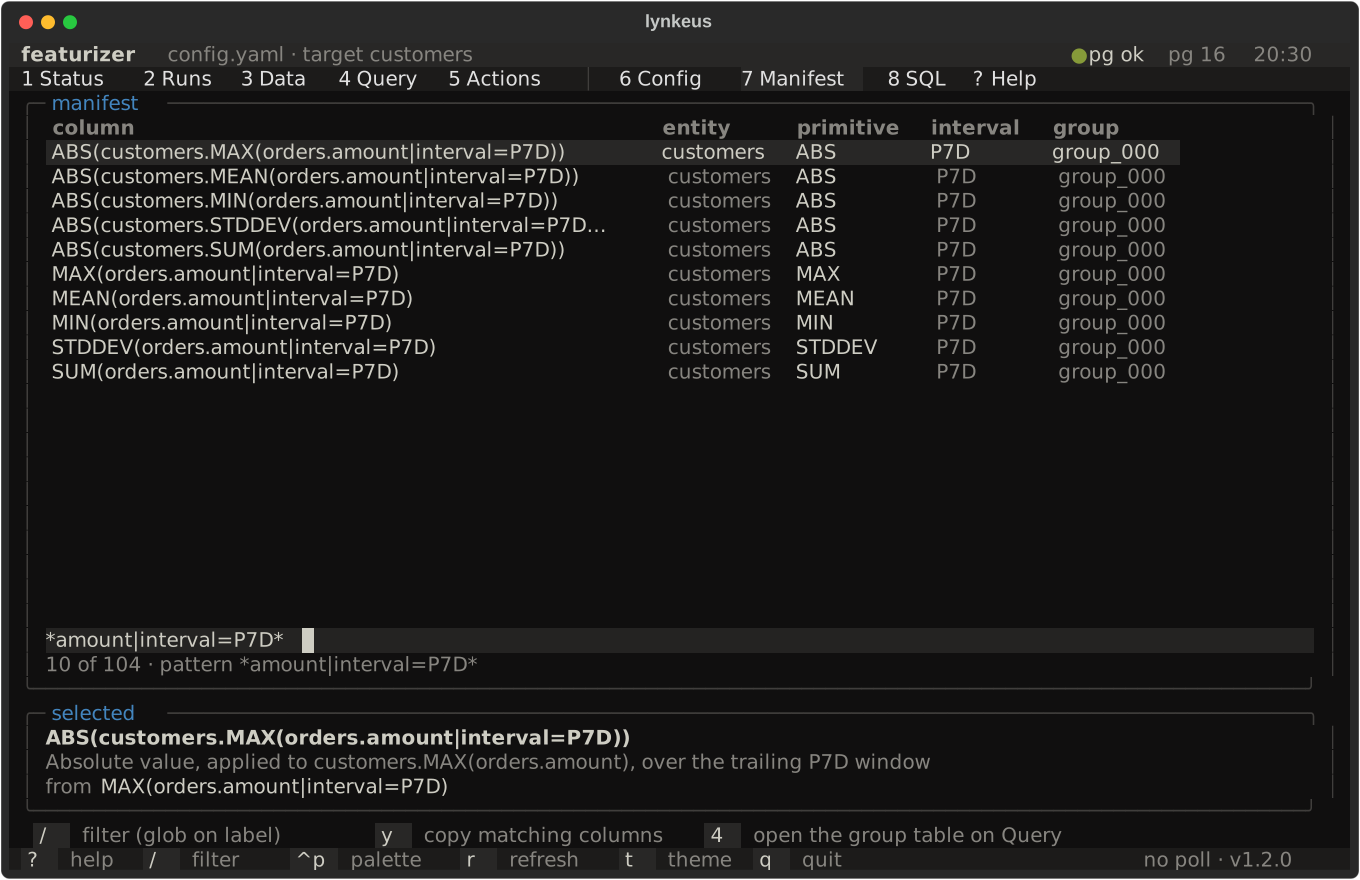
The Manifest filter is the library’s glob. / runs
manifest_matching against the full
label, so *orders.amount|interval=P7D* means exactly what it means in
Python and in columns_matching. Physical names capped at 63 bytes are
matched by their label, never by the hash-truncated column; the selected row
shows both.
The same screen with a filter applied — / narrows the table to the columns
whose label matches the glob, and the count in the header follows:
The SQL screen never runs a group for its rows. x is explain (analyze, buffers) inside a transaction the shell rolls back, which is enough to see
the plan and the timings. Writing the tables is the featurizer materialize
action, confirmed and streamed from Actions like any other; it drops and
recreates the group tables it writes, so the shell asks first.
Headless twins
Section titled “Headless twins”What a person watches, an agent reads from the same adapters. Each verb
prints a table, or JSON with --json:
python -m featurizer status --config config.yaml [--schema S] [--json]python -m featurizer runs list [--schema S] [--json]python -m featurizer runs show example_01.customers [--json]python -m featurizer query "select count(*) from example_01.customers_manifest" [--json]python -m featurizer actions list [--json]python -m featurizer actions run "just test-fast"A run’s id is schema.stem; runs show also takes a unique prefix.
Two verbs exist for the palette and are useful on their own, both thin wrappers over frozen methods:
python -m featurizer render --config config.yaml # Featurizer.querypython -m featurizer render --config config.yaml --group group_001 # one entry of query_groupspython -m featurizer materialize --config config.yaml --schema features [--table-prefix stem]materialize calls to_tables() and prints the tables it wrote, the
manifest last.
What it is not
Section titled “What it is not”The cockpit decides nothing and writes nothing. Status and Runs are queries
over what exists; the Config, Manifest and SQL screens call the public
Featurizer methods and the validate verb’s own function; work starts only
through just recipes and python -m featurizer verbs as subprocesses. It
adds no run ledger and no persisted table — a new table would sit on the
frozen API’s side of the line,
and a timestamp nobody wrote cannot be invented. Nothing here changes the
public surface; the cockpit is an optional extra and the two verbs are
additive.